
Spectral variants
Let each cell use the version of each fluorophore's spectrum that fits it best, to reduce spillover spread and skews between similar dyes.
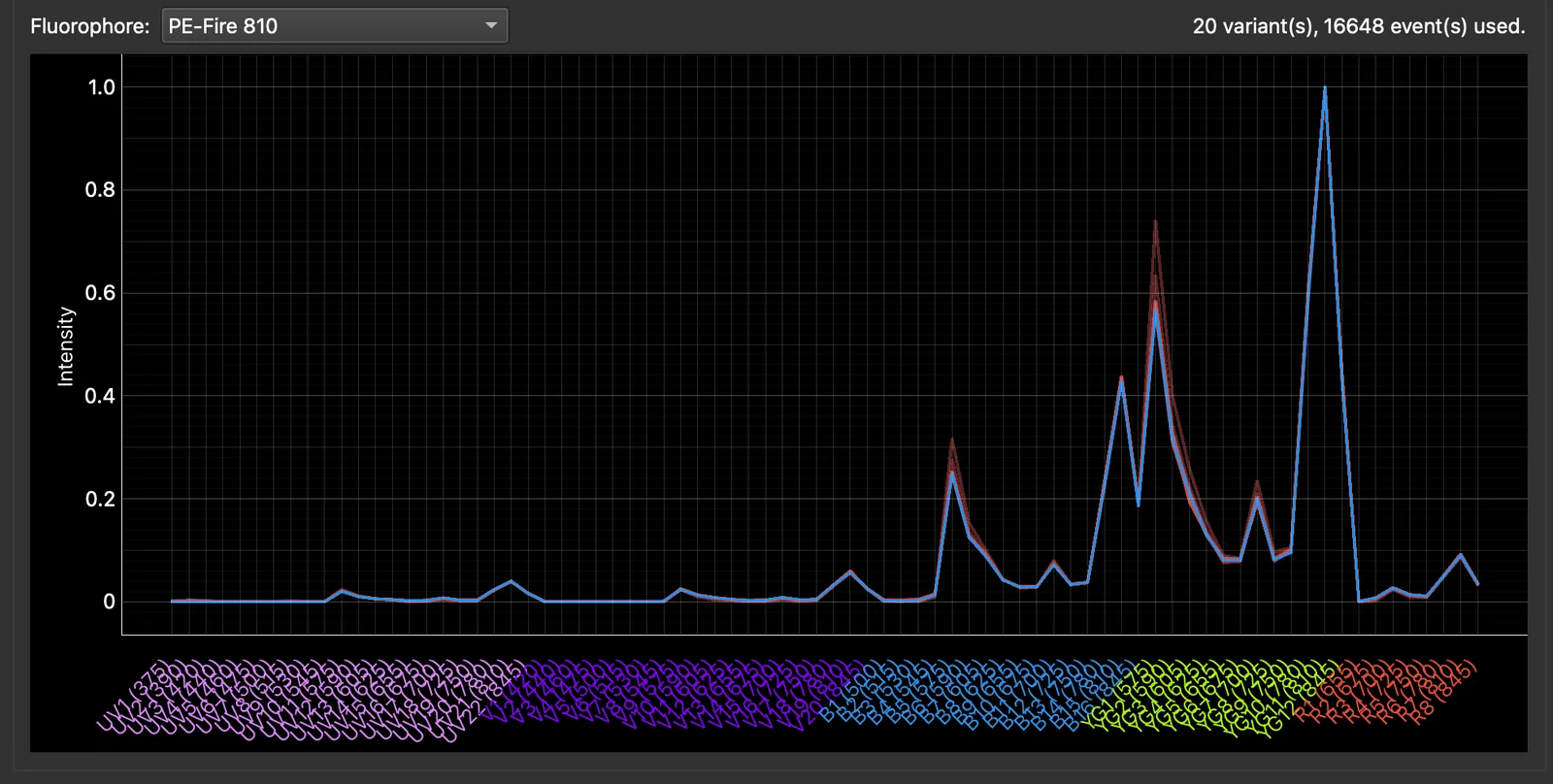
A fluorophore’s spectrum is not quite the same in every cell: tandem dyes break down to different degrees, and a dye’s local environment shifts its emission a little. The Spectral Variants page finds that variation in each single-stained control. Unmixing can then choose, for every cell, the variant of each fluorophore that fits it best, together with the cell’s autofluorescence. This is the per-cell optimisation of the AutoSpectral package.
It needs AF profiles with at least two spectra assigned to your samples (Autofluorescence). It is an alternative to the noise model; you cannot use both.
Compute and use the variants
- Press Compute Spectral Variants.
- The variants of each fluorophore are found by clustering the background-corrected, scatter-matched positive events of its single-stained control.
- Near-identical variants are merged, keeping at most 10 per fluorophore by default (Advanced Settings).
- A necessity score estimates how much each fluorophore’s variation would change the unmixing of the rest of the panel. Only fluorophores above the threshold are optimised per cell; the others keep their reference spectrum.
- A fluorophore with too little clean signal keeps its single reference spectrum. This is not an error, just nothing to optimise.
- Plot Spectral Variants shows the variants of a chosen fluorophore (faint) against its reference spectrum (solid).
- Tick Use spectral variants for the experiment’s unmixing. This is not available while the noise model is in use.
The comparison shows the current sample with per-cell AF alone, and with per-cell AF plus spectral variants. It is subsampled for speed.
What good looks like: the trumpet-shaped spread of a bright dye into its spectral neighbours narrows, and skews between similar dyes flatten, while the populations themselves stay where they were.
Settings and speed
Tick Show Advanced Settings for the settings of the variant search, the necessity score, the unmixing and the comparison. The unmixing settings are stored with the experiment.
As with the noise model:
- the Unmixed Data tab shows per-cell AF first and swaps in the result when it is ready;
- results are cached;
- unmixed exports with spectral variants start with a time estimate.
While another long job runs, Compute Spectral Variants, the Use tick box and the unmixing settings are greyed out; see Long jobs.
Further reading
- Burton OT et al. AutoSpectral improves spectral flow cytometry accuracy through optimised spectral unmixing and autofluorescence-matching at the cellular level. bioRxiv 2025. doi:10.1101/2025.10.27.684855. See Figure 7 and the Science page.
- Konecny AJ, Mage PL, Tyznik AJ, Prlic M, Mair F. OMIP-102: 50-color phenotyping of the human immune system with in-depth assessment of T cells and dendritic cells. Cytometry A 2024;105(6):430–436. doi:10.1002/cyto.a.24841